88Emu emulates the hardware inside most Sound Canvas modules, MT-32 and related earlier sound generators, used for retro gaming and DTM. It runs the original firmware on emulated CPUs and sound chips, including the firmware’s instrument selection, voice allocation, effects, MIDI handling and front-panel behavior. You supply the ROM images; they are not included.
88EmuPlayer is NOT a DAW-compatible plugin, but instead a standalone application for playing MIDI files and using those devices from a MIDI keyboard, sequencer or game. 88EmuCli uses the same emulation to render files to WAV offline using a command line interface, without having to wait for the song to play in real time.
Please read the provided README and these instructions carefully.
Is 88Emu ever gonna be released as DAW plugin?
Yes, soon.
Demo Video
Emulator Downloads Links
88EmuPlayer (Roland Sound Canvas, MT-32 and related synths), latest version:
Other package formats (.deb, .rpm) are on the release page.
Older versions can be found on our GitHub Releases Page.
For further information, resources, discussion, and support of our plugins including the absolute latest beta versions (including the most current features and fixes) please visit our Discord.
This software wouldn’t have been possible without the previous efforts of NukeYKT (LA32 and GP chip core, LCD emulator), MAME (reference CPU cores) and many other people that collaborated in the reverse engineering, development and testing effort. Thanks!
Usage Guide
The zip files you can download contains two executable files/apps:
- 88EmuPlayer: Double click on this one if you want to use the software to play with a MIDI keyboard, playback MIDI files or use it to play retro video games;
- 88EmuCli: if you want to quickly convert MIDI files into WAV files, without having to wait for the time of the song to pass in real time. This is a console application, so you probably want to run it from your terminal.
MacOS users: macOS quarantines programs downloaded from the internet and can refuse to open 88EmuPlayer or 88EmuCli the first time, saying it could not verify them. Open System Settings → Privacy & Security, scroll down to Security, click Open Anyway next to the message about the program, and confirm. This is needed once per program; for 88EmuCli, run it once in Terminal first so that the message appears. On macOS 14 and earlier, Control-clicking the app in Finder and choosing Open also works.
Once you run the application, you can select with device you want to emulate, like the SC-88 or the SC55mkII. Once you click on the device, a dialog will appear helping you correctly installing the necessary ROM files into the emulator.
You can then configure your MIDI inputs and audio outputs in Settings, open/drag MIDI files to be played into the MIDI player area, interact with the hardware buttons to configure the unit.
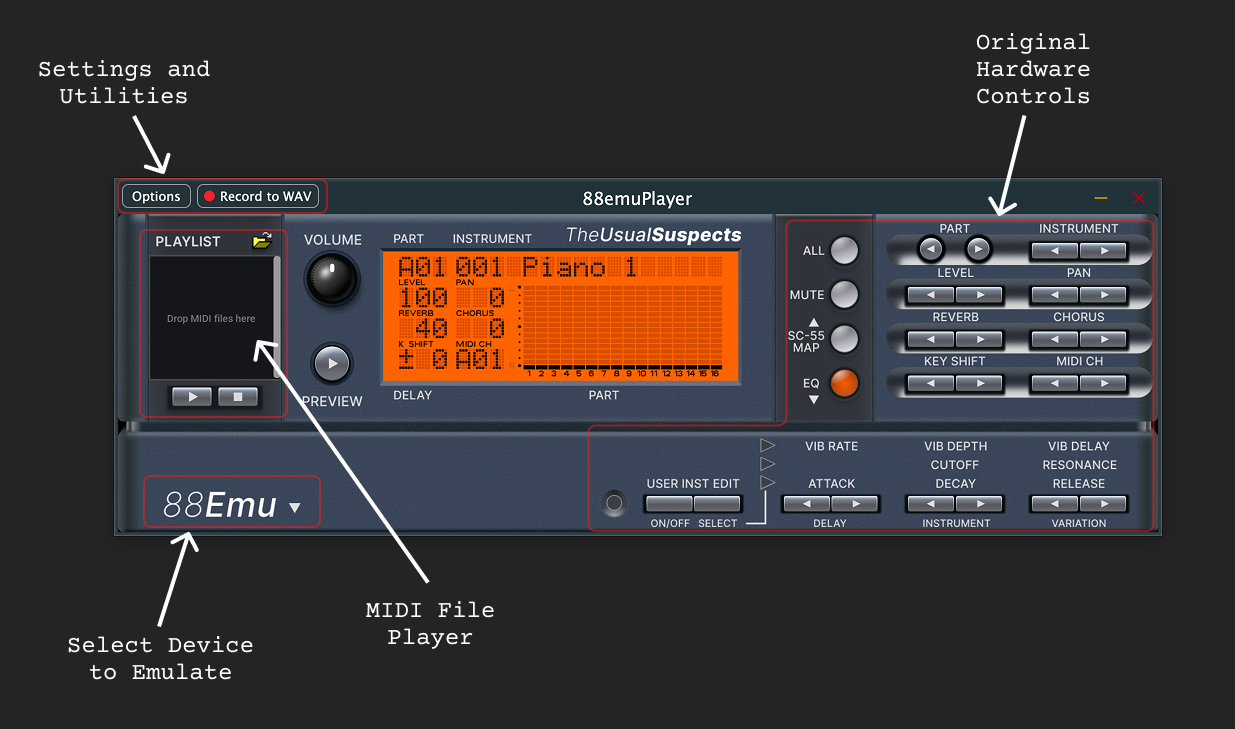
Please refer to the included README for the rest of the options, features, gotchas, and configuration.
Usage for Retro-Gaming
You can use 88EmuPlayer for playing older games that use MT-32/CM-32L, CM-64, General MIDI or GS music.
To achieve this you will need to route the MIDI output of your game or emulator (such as DOSBox, ScummVM or Neko Project) into 88EmuPlayer. If you are in a MacOS or Linux system, an option is available to create a “Virtual MIDI port”, so that 88EmuPlayer can already show up as available option in the MIDI configuration of your emulator. If you are in a Windows based system, though, you will need to use a 3rd party software for that, such as LoopBe1 or loopmidi.
Here you can see for example 88EmuPlayer accurately emulating the sound of the the CM-64 (previously unemulated), using MAME as Sharp X68000 emulator.
Part Editor
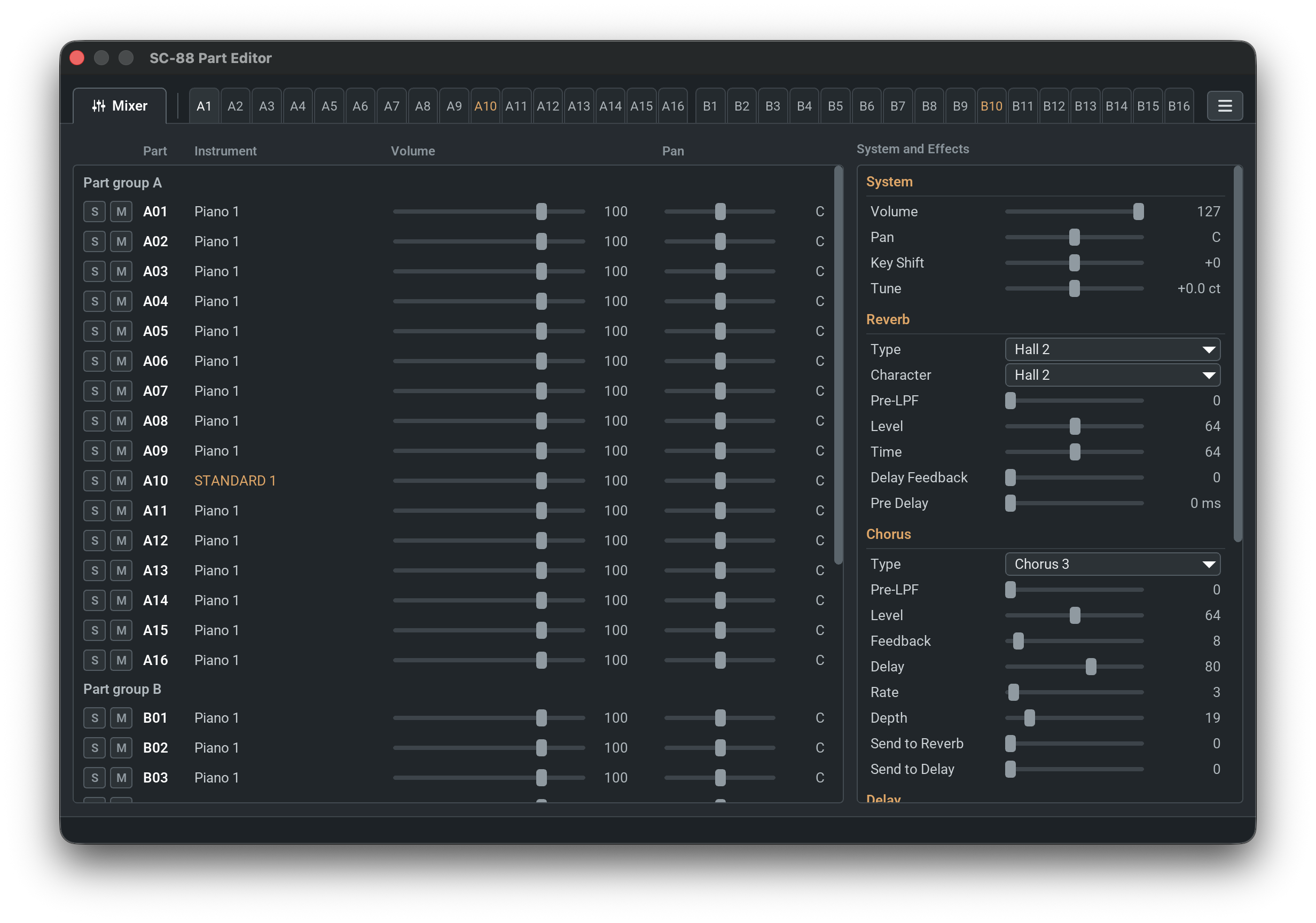
To make the usage easier for musical purposes, we provide a Part Editor for Sound Canvas, MT-32 and CM-32P modules. The Part Editor can be opened with the Options menu, or by double clicking on the emulated LCD display.
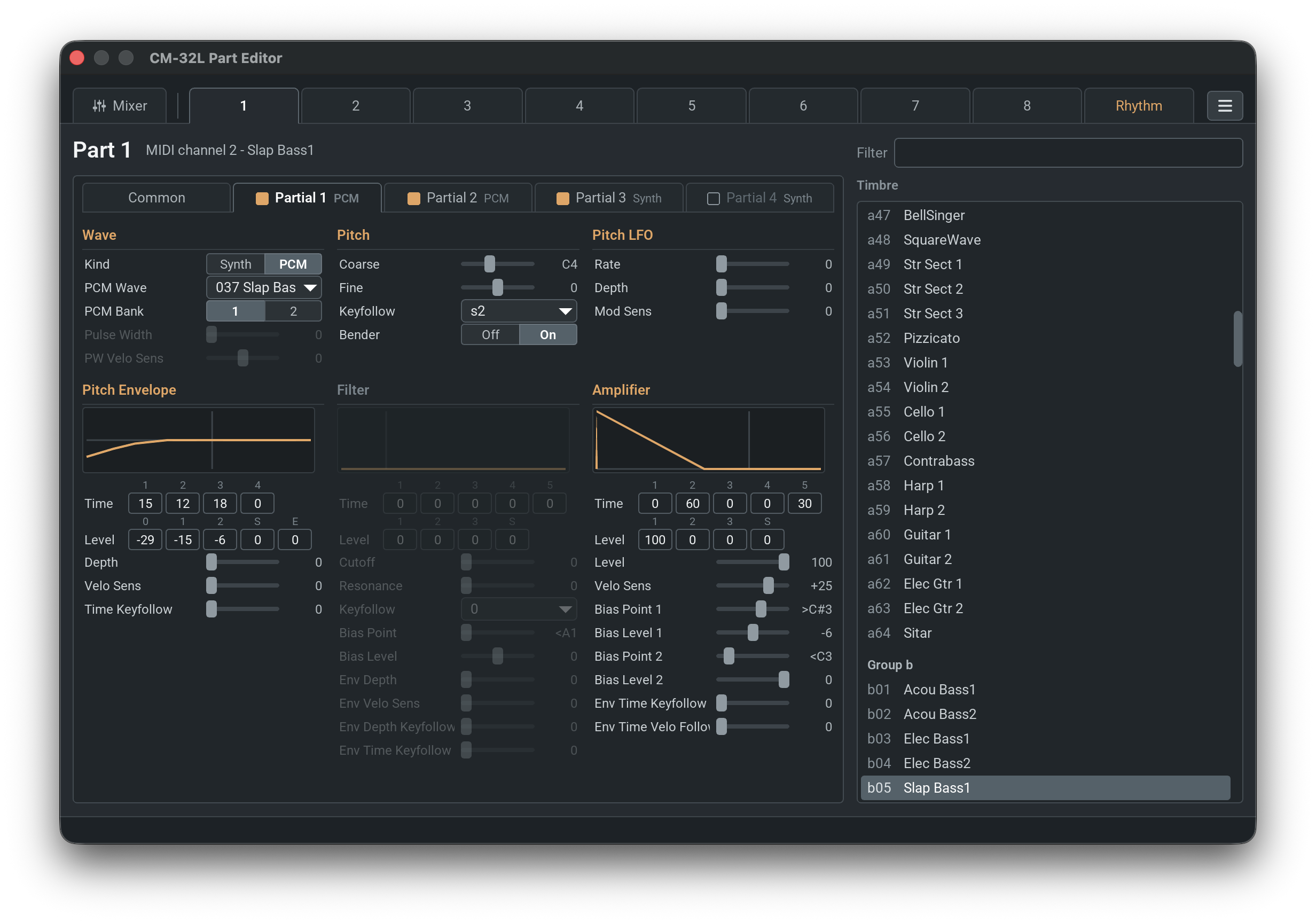
For the MT-32, the entire patch and its partials can also be edited.
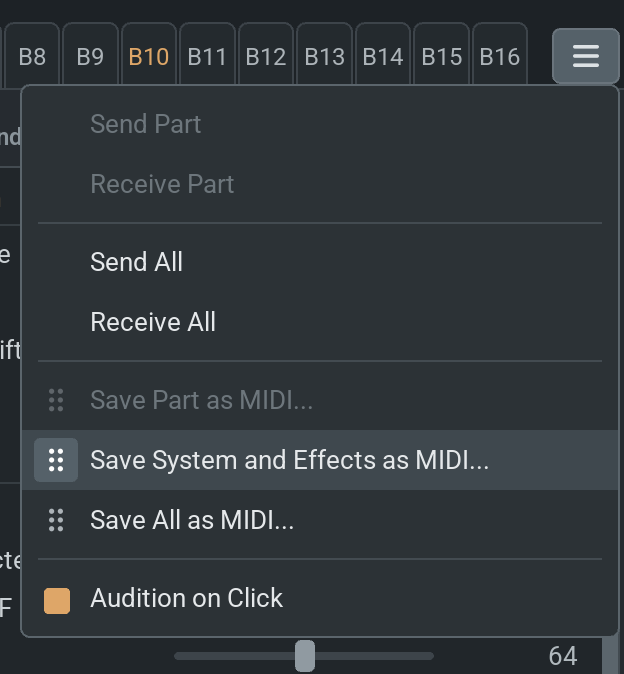
To save the changed part settings, MIDI file export is available. It’s also possible to drag a midi region from the dots icon to your DAW.
Asking for help
Please read our Support Guide which can be found HERE to find out how and where to get support and assistance for our emulators.
PRO TIP: To avoid frustration, confusion, and running afoul of the rules, it is essential for all users to read the provided README and our FAQ and Pinned Messages in the the various support channels in the Discord; answers to most of the common questions will be found in those locations.
Notes about ROM/Firmware
Our emulator(s) work by executing the original code (ROM/firmware) of the synth it is emulating; it is not capable of generating audio on its own. Our emulators are intended for use only by legitimate owners of the hardware synth(s). As such, owners of these synths typically have access to such files through the manufacturer for users entitled to do so, usually in the form of installation packages or OS system updates. We cannot legally provide you with this ROM/firmware as part of the emulator nor provide any assistance nor accept any responsibility or liability for any illegal usage of these emulators. Per our #rules published on our Discord server, no discussion of how to acquire ROM/Firmware will be tolerated in our community and may result in a ban.
Important Notice
88EmuPlayer and 88EmuCli are free software: you can redistribute them and/or modify them under the terms of the GNU General Public License, version 3, as published by the Free Software Foundation. They are distributed in the hope that they will be useful, but without any warranty, without even the implied warranty of merchantability or fitness for a particular purpose. LICENSE.md contains the full license. The GPL entitles you to the complete corresponding source code. The third-party components listed above keep their own licenses.
It is the sole responsibility of the user to operate this emulator within the bounds of all applicable laws. Using it with ROM images you are not legally entitled to own is forbidden by copyright law. If you are not legally entitled to use it, please stop using it. This package contains no ROM images.
Roland, Sound Canvas, GS and the Roland product names in this document are trademarks of Roland Corporation. Yamaha and XG are trademarks of Yamaha Corporation. 88EmuPlayer is an independent project and is not affiliated with, sponsored by or endorsed by Roland or Yamaha.