New latency setting in Osirus 1.2.19
May 25, 2022
As there were some questions regarding this, a general explanation about latency and further insights about the new setting in Osirus 1.2.19 (currently in beta testing phase)
*
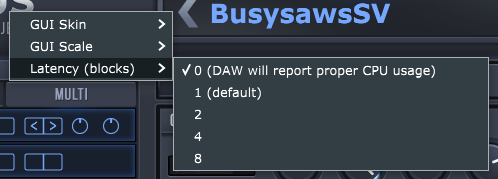
Latency setting in Osirus 1.2.19
* Osirus always processes the DSP in a separate thread. There are multiple reasons for this, but one advantage is that the DSP can continue doing work even if the DAW does not ask us to process anything. This results in a higher throughput.
If you imagine how a DAW processes plugins, it looks a bit like this.

Of course, it is much more complex, especially if a DAW uses multiple threads to process plugins. But in general, any DAW needs to process our plugin first and then any FX that we have chained after. The consequence is that we are unable to continue doing DSP processing work as long as the DAW doesn’t allow us to do so. This is an issue if the used host CPU is slow and cannot finish processing the required amount of data in the timeframe that the DAW provides to us.
If we add one audio block of latency though, we can change this behavior. We can start a separate thread that does DSP processing which will continue to run even if the DAW doesn’t ask for a new block of audio data yet.

In Osirus, we do exactly that. We tell the DSP thread when its time to process a block of audio data and at the same time, we retrieve the previous work that the DSP thread must have finished processing by now.
While this behavior has the advantage of allowing slower CPUs to use the plugin, the disadvantage of this is one block of latency and also that the DAW CPU meter does not tell you the amount of work that is done in the DSP thread.
The DAW CPU meter will calculate the CPU usage based on how long it took the plugin to finish processing the submitted audio block. As we do not really do any work in the DAW audio thread, the DAW CPU meter displays a surprisingly low number as it is not aware that we do the heavy lifting in a separate thread that runs independently.
However, if the DSP thread does not finish in time and the audio thread needs to enter blocking state because it has to wait for the DSP thread to finish, the DAW CPU meter instantly jumps to 100% because the DSP thread was too slow. This is why many users with slower CPUs report “CPU spikes”, even though it doesn’t really spike, its just that your CPU is very close to being maxed out and depending on the voice count and other circumstances, may not be fast enough.
The new latency setting
The additional latency can now be adjusted. Please note that this setting is multiplied with the audio block size. The default setting is 1, which represents the old behavior as explained above.
Users with slower CPUs may want to increase this value, the DSP thread will have even more time to finish work, but the latency will increase.
Users with fast CPUs may want to set it to zero, in which case the DAW audio thread will wait for the DSP to finish its work, eliminating the additional latency entirely. A side effect of this is that the DAW will report the proper CPU usage, so if you’re unsure if the “spikes” are real, set it to zero to see what the real CPU load is.
Device Latency
Note that all of the above is independent from the device latency, i.e. the latency that is introduced by the emulated ROM itself. For example, a Virus B&C has about 370 samples of midi-to-output latency at 46875 Hz with a jitter +/- 60 samples. This latency is converted to the DAW samplerate and is always reported on top of the latency that the plugin introduces depending on the latency setting above.